|
|
POLYGONName:
Although Dataplot provides many specific geometric figures, the POLYGON command provides the most flexible option. That is, you can create an arbitrarily complex geometric figure to append to a plot.
where <x> is an array of x coordinates; <y> is an array of y coordinates; and where the <SUBSET/EXCEPT/FOR qualification> is optional and rarely used in this context. In this syntax, the coordinates are specified in absolute 0 to 100 Dataplot screen units.
where <x> is an array of x coordinates; <y> is an array of y coordinates; and where the <SUBSET/EXCEPT/FOR qualification> is optional and rarely used in this context. In this syntax, the coordinates are specified in absolute units of the most recent plot.
where <x> is an array of x coordinates; <y> is an array of y coordinates; and where the <SUBSET/EXCEPT/FOR qualification> is optional and rarely used in this context. In this syntax, the first coordinate is specified in absolute 0 to 100 Dataplot screen units. Subsequent points are relative to the prior point (i.e., point 2 is relatvie to point 1, point 3 is relative to point 2, etc.) in Dataplot 0 to 100 screen units.
where <x> is an array of x coordinates; <y> is an array of y coordinates; and where the <SUBSET/EXCEPT/FOR qualification> is optional and rarely used in this context. In this syntax, the first coordinate is specified in absolute units of the most recent plot. Subsequent points are relative to the prior point (i.e., point 2 is relatvie to point 1, point 3 is relative to point 2, etc.) in units of the most recent plot.
LET Y = DATA 0 0 10 10 0 POLYGON DATA X Y
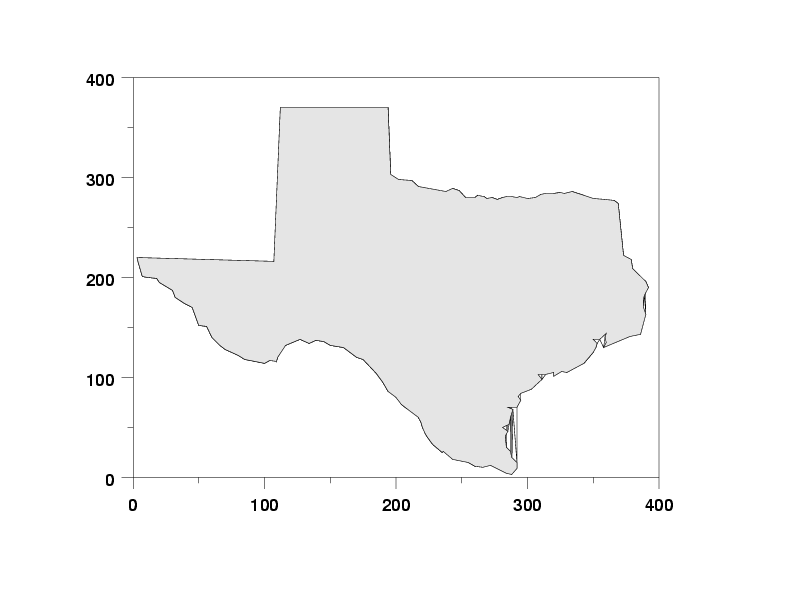
READ TEXAS.DAT X Y . PLOT Y X . REGION FILL ON REGION FILL COLOR G90 POLYGON DATA X Y
|
Privacy
Policy/Security Notice
NIST is an agency of the U.S.
Commerce Department.
Date created: 06/05/2001 | ||||||||||||||||||||||||||